Improving static comments with Jekyll & Staticman

Table of contents
In the months after ditching Disqus for a static-based commenting system, Staticman has matured with feature adds like threaded comments and email notifications.
Armed with instructions provided by Eduardo Bouças in this GitHub issue, I set off to level-up the commenting experience on Made Mistakes. Here’s how I did it.
Upgrade to Staticman v2
To take advantage of the new features, it was necessary to migrate Staticman settings from Jekyll’s _config.yml file into a new staticman.yml file1. None of the parameter names changed making the transition to v2 that much easier.
comments:
  allowedFields     : ['name', 'email', 'url', 'message']
  branch            : "master"
  commitMessage     : "New comment."
  filename          : "comment-{@timestamp}"
  format            : "yaml"
  moderation        : true
  path              : "src/_data/comments/{options.slug}"
  requiredFields    : ['name', 'email', 'message']
  transforms:
    email           : md5
  generatedFields:
    date:
      type          : "date"
      options:
format : "iso8601"Be sure to check the sample configuration file and full list of parameters for setup ideas.
For example you can configure multiple properties (comments, reviews, and other types of user-generated content), change commit message and request body text, enable email notifications, and much more from a staticman.yml file.
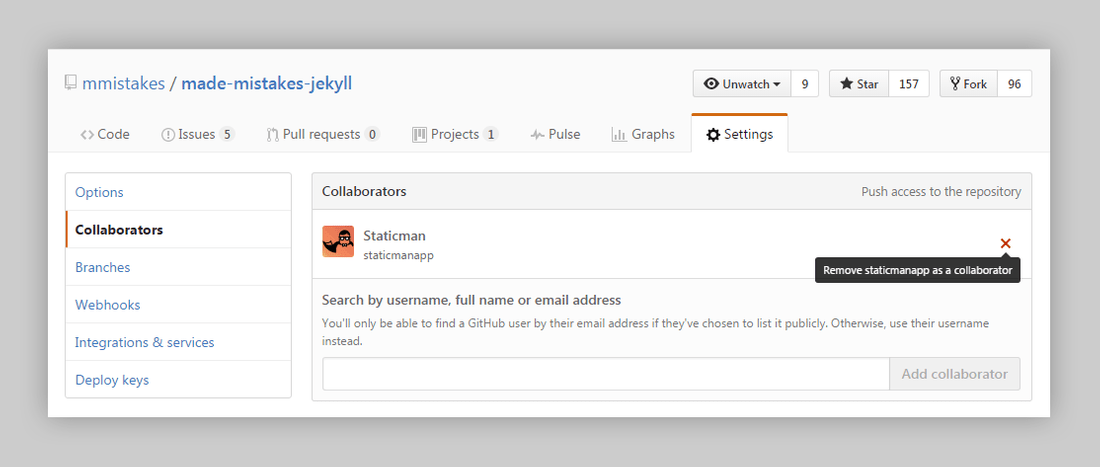
Remove/add Staticman as a collaborator
I’m not entirely sure if doing the following was necessary. I encountered errors when submitting test comments and this appeared to solve the problem. It’s possible I mis-configured something else and that was the real issue…
Either way, let me know about your experience upgrading from Staticman v1 to v2 in the comments below.
- Revoked collaboration rights for Staticman
v1by removing from my GitHub repository.
- Added Staticman back as collaborator.
- Pinged the version 2 endpoint
https://api.staticman.net/v2/connect/{your GitHub username}/{your repository name}to accept the collaboration invitation.
Update POST endpoint in comment form
To POST correctly to Staticman, the action attribute in my comment form needed a small update. Changing v1 to v2 in _includes/page__comments.html and appending /comments2 to the end did the trick for me.
<form id="comment-form" class="page__form js-form form" method="post" action="https://api.staticman.net/v2/entry/{{ site.repository }}/{{ site.staticman.branch }}/comments">Add support for threaded comments
Getting nested comments working was a big pain point for me. Numerous Liquid errors, trying to wrap my head around for loops inside of other for loops, array filters that broke things, and more — took me a bit to figure out.
Add “replying to” identifier
To properly nest replies I needed a way of determining their hierarchy. I went with a field named replying_to and added it as an allowedField to my Staticman config file:
allowedFields: ["name", "email", "url", "message", "replying_to"]And to my comment form as a hidden field:
<input type="hidden" id="comment-parent" name="fields[replying_to]" value="">After publishing this article I learned that options[parent] is meant to identify subscription entries, and not comment lineage. I’ve since changed to fields[replying_to] and updated the article and sample code to reflect this.
Update Liquid loops
To avoid displaying duplicates, I needed to exclude replies and only top level comments in the main loop. This seemed like the perfect use-case for Jekyll’s where_exp filter:
Select all the objects in an array where the expression is true. Jekyll v3.2.0 & later. Example: site.members | where_exp: "item", "item.graduation_year == 2014"
If the hidden fields[replying_to] field I added to the form was working properly I should have comment data files similar to these:
Parent comment example
message: This is parent comment message.
name: First LastName
email: md5g1bb3r15h
date: '2016-11-30T22:03:15.286Z'
Child comment example
message: This is a child comment message.
name: First LastName
email: md5g1bb3r15h
replying_to: '7'
date: '2016-11-02T05:08:43.280Z'
As you can see above, the “child” comment has replying_to data populated from the hidden fields[replying_to] field in the form. Using this knowledge I tested against it using where_exp:"comment", "comment.replying_to == blank" to create an array of only “top-level” comments.
{% assign comments = site.data.comments[page.slug] | sort | where_exp: "comment", "comment[1].replying_to == blank" %}
{% for comment in comments %}
  {% assign avatar      = comment[1].avatar %}
  {% assign email       = comment[1].email %}
  {% assign name        = comment[1].name %}
  {% assign url         = comment[1].url %}
  {% assign date        = comment[1].date %}
  {% assign message     = comment[1].message %}
  {% include comment.html avatar=avatar email=email name=name url=url date=date message=message %}
{% endfor %}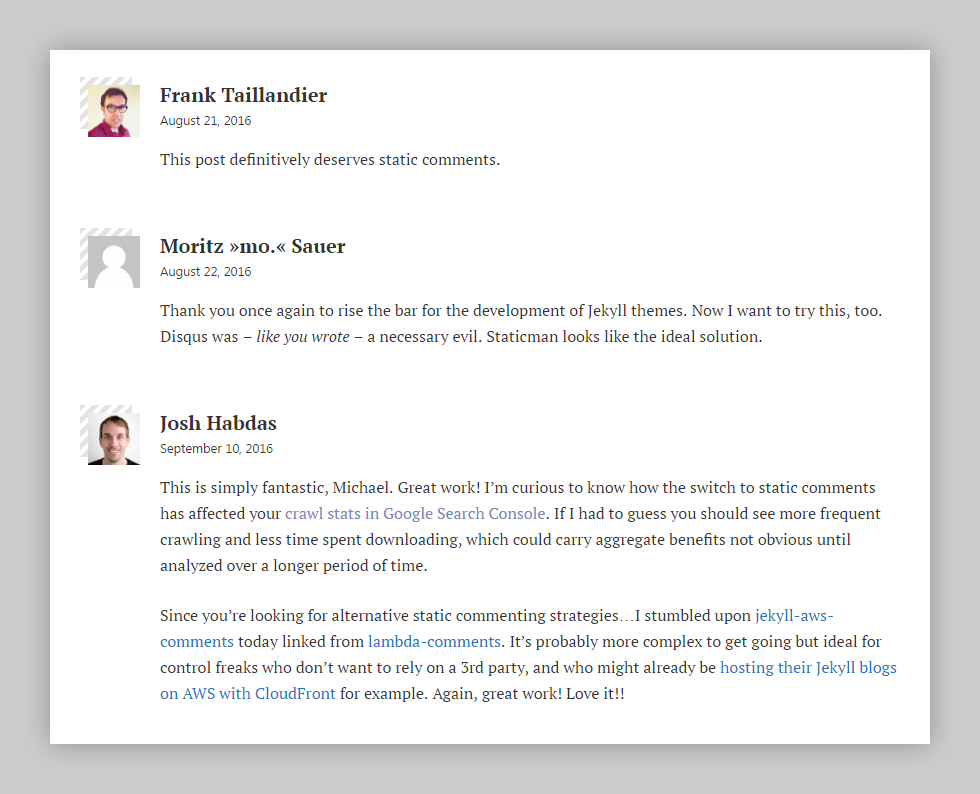
Success, there be parent comments Captain!
sort and where filters don’t mixI ran into strange behaviors and errors due to mixing a sort filter with where and where_exp. Came to the conclusion it was unnecessary as the items were already being sorted alphabetically based on their filenames, and removed the filter.
I’m using the following: filename: \"comment-{@timestamp}\" structure. Your mileage may vary depending on how you name entries.
sort filterNot exactly sure if it’s a filesystem or OS thing, but building my site with Travis CI shuffled the order of comments. Applying sort to the comments assign was necessary to get everything in the correct chronological order.
Displaying nested comments
Here is what I was looking to accomplish… before the headaches started.
- Start a loop and on each iteration create a new array named
repliesof only reply comments. - Evaluate the value of
replying_toin these replies. - If
replying_tois equal to the index of the parent loop then it’s a child and should be treated as one. - If not, move on to the next entry in the array.
- Rinse and repeat.
I determined the easiest way of assigning a unique identifier to each parent comment would be sequentially. Thankfully Liquid provides a way of doing this with forloop.index.
{% assign index = forloop.index %}I realize an index based unique identifier isn’t the smartest way to go about this. I have a mix of comment data migrated from Disqus and pre Staticman generating UUIDs as _id variables, so this made sense. YMMV.
Next I nested a modified copy of the “top-level comment” loop from before inside of itself — to function as the “child” or replies loop.
{% capture i %}{{ include.index }}{% endcapture %}
{% assign replies = site.data.comments[page.slug] | sort | where_exp: "comment", "comment[1].replying_to == i" %}
{% for reply in replies %}
  {% assign index       = forloop.index | prepend: '-' | prepend: include.index %}
  {% assign replying_to = reply[1].replying_to %}
  {% assign avatar      = reply[1].avatar %}
  {% assign email       = reply[1].email %}
  {% assign name        = reply[1].name %}
  {% assign url         = reply[1].url %}
  {% assign date        = reply[1].date %}
  {% assign message     = reply[1].message %}
  {% include comment.html index=index replying_to=replying_to avatar=avatar email=email name=name url=url date=date message=message %}
{% endfor %}
Unfortunately the where_exp filter proved troublesome yet again, causing Jekyll to error out with: Liquid Exception: Liquid error (line 47): Nesting too deep in /_layouts/page.html.
After brief thoughts of the movie Inception, I applied an inspect filter to help troubleshoot the replies loop. I determined that the where_exp condition was failing3 because I was trying to compare an integer against a string :flushed:.
To solve this I placed a capture tag around the index variable to convert it from an integer into a string. Then modified the where_exp condition to compare replying_to against this new {{ i }} variable — fixing the issue and allowing me to move on.
{% capture i %}{{ include.index }}{% endcapture %}
{% assign replies = site.data.comments[page.slug] | where_exp:"item", "item.replying_to == i" %}
_includes/page__comments.html
<section class="page__reactions">
  {% if site.repository and site.staticman.branch %}
    {% if site.data.comments[page.slug] %}
      <!-- Start static comments -->
      <div id="comments" class="js-comments">
        <h2 class="page__section-label">
          {% if site.data.comments[page.slug].size > 1 %}
            {{ site.data.comments[page.slug] | size }}
          {% endif %}
          Comments
        </h2>
        {% assign comments = site.data.comments[page.slug] | sort | where_exp: 'comment', 'comment[1].replying_to == blank' %}
        {% for comment in comments %}
          {% assign index       = forloop.index %}
          {% assign replying_to = comment[1].replying_to | to_integer %}
          {% assign avatar      = comment[1].avatar %}
          {% assign email       = comment[1].email %}
          {% assign name        = comment[1].name %}
          {% assign url         = comment[1].url %}
          {% assign date        = comment[1].date %}
          {% assign message     = comment[1].message %}
          {% include comment.html index=index replying_to=replying_to avatar=avatar email=email name=name url=url date=date message=message %}
        {% endfor %}
      </div>
      <!-- End static comments -->
    {% endif %}

    {% unless page.comments_locked == true %}
      <!-- Start new comment form -->
      <div id="respond">
        <h2 class="page__section-label">Leave a Comment <small><a rel="nofollow" id="cancel-comment-reply-link" href="{{ page.url | absolute_url }}#respond" style="display:none;">Cancel reply</a></small></h2>
        <form id="comment-form" class="page__form js-form form" method="post" action="https://api.staticman.net/v2/entry/{{ site.repository }}/{{ site.staticman.branch }}/comments">
          <fieldset>
            <label for="comment-form-message"><strong>Comment</strong> <small>(<a href="https://kramdown.gettalong.org/quickref.html">Markdown</a> is allowed)</small></label>
            <textarea type="text" rows="6" id="comment-form-message" name="fields[message]" required spellcheck="true"></textarea>
          </fieldset>
          <fieldset>
            <label for="comment-form-name"><strong>Name</strong></label>
            <input type="text" id="comment-form-name" name="fields[name]" required spellcheck="false">
          </fieldset>
          <fieldset>
            <label for="comment-form-email"><strong>Email</strong> <small>(used for <a href="http://gravatar.com">Gravatar</a> image and reply notifications)</small></label>
            <input type="email" id="comment-form-email" name="fields[email]" required spellcheck="false">
          </fieldset>
          <fieldset>
            <label for="comment-form-url"><strong>Website</strong> <small>(optional)</small></label>
            <input type="url" id="comment-form-url" name="fields[url]"/>
          </fieldset>
          <fieldset class="hidden" style="display: none;">
            <input type="hidden" name="options[origin]" value="{{ page.url | absolute_url }}">
            <input type="hidden" name="options[parent]" value="{{ page.url | absolute_url }}">
            <input type="hidden" id="comment-replying-to" name="fields[replying_to]" value="">
            <input type="hidden" id="comment-post-id" name="options[slug]" value="{{ page.slug }}">
            <label for="comment-form-location">Leave blank if you are a human</label>
            <input type="text" id="comment-form-location" name="fields[hidden]" autocomplete="off">
          </fieldset>
          <!-- Start comment form alert messaging -->
          <p class="hidden js-notice">
            <span class="js-notice-text"></span>
          </p>
          <!-- End comment form alert messaging -->
          <fieldset>
            <label for="comment-form-reply">
              <input type="checkbox" id="comment-form-reply" name="options[subscribe]" value="email">
              Notify me of replies by email.
            </label>
            <button type="submit" id="comment-form-submit" class="btn btn--large">Submit Comment</button>
          </fieldset>
        </form>
      </div>
      <!-- End new comment form -->
    {% else %}
      <p><em>Comments are closed. If you have a question concerning the content of this page, please feel free to <a href="/contact/">contact me</a>.</em></p>
    {% endunless %}
  {% endif %}
</section>
_includes/comment.html
<article id="comment{% unless include.r %}{{ index | prepend: '-' }}{% else %}{{ include.index | prepend: '-' }}{% endunless %}" class="js-comment comment {% if include.name == site.author.name %}admin{% endif %} {% unless include.replying_to == 0 %}child{% endunless %}">
  <div class="comment__avatar">
    {% if include.avatar %}
      <img src="{{ include.avatar }}" alt="{{ include.name | escape }}">
    {% elsif include.email %}
      <img src="https://www.gravatar.com/avatar/{{ include.email }}?d=mm&s=60" srcset="https://www.gravatar.com/avatar/{{ include.email }}?d=mm&s=120 2x" alt="{{ include.name | escape }}">
    {% else %}
      <img src="/assets/images/avatar-60.png" srcset="/assets/images/avatar-120.png 2x" alt="{{ include.name | escape }}">
    {% endif %}
  </div>
  <h3 class="comment__author-name">
    {% unless include.url == blank %}
      <a rel="external nofollow" href="{{ include.url }}">
        {% if include.name == site.author.name %}<svg class="icon" width="20px" height="20px"><use xlink:href="#icon-mistake"></use></svg> {% endif %}{{ include.name }}
      </a>
    {% else %}
      {% if include.name == site.author.name %}<svg class="icon" width="20px" height="20px"><use xlink:href="#icon-mistake"></use></svg> {% endif %}{{ include.name }}
    {% endunless %}
  </h3>
  <div class="comment__timestamp">
    {% if include.date %}
      {% if include.index %}<a href="#comment{% if r %}{{ index | prepend: '-' }}{% else %}{{ include.index | prepend: '-' }}{% endif %}" title="path to this comment">{% endif %}
      <time datetime="{{ include.date | date_to_xmlschema }}">{{ include.date | date: '%B %d, %Y' }}</time>
      {% if include.index %}</a>{% endif %}
    {% endif %}
  </div>
  <div class="comment__content">
    {{ include.message | markdownify }}
  </div>
  {% unless include.replying_to != 0 or page.comments_locked == true %}
    <div class="comment__reply">
      <a rel="nofollow" class="btn" href="#comment-{{ include.index }}" onclick="return addComment.moveForm('comment-{{ include.index }}', '{{ include.index }}', 'respond', '{{ page.slug }}')">Reply to {{ include.name }}</a>
    </div>
  {% endunless %}
</article>

{% capture i %}{{ include.index }}{% endcapture %}
{% assign replies = site.data.comments[page.slug] | sort | where_exp: 'comment', 'comment[1].replying_to == i' %}
{% for reply in replies %}
  {% assign index       = forloop.index | prepend: '-' | prepend: include.index %}
  {% assign replying_to = reply[1].replying_to | to_integer %}
  {% assign avatar      = reply[1].avatar %}
  {% assign email       = reply[1].email %}
  {% assign name        = reply[1].name %}
  {% assign url         = reply[1].url %}
  {% assign date        = reply[1].date %}
  {% assign message     = reply[1].message %}
  {% include comment.html index=index replying_to=replying_to avatar=avatar email=email name=name url=url date=date message=message %}
{% endfor %}
Comment reply HTML and JavaScript
Next up was to add some finishing touches to pull everything together.
Familiar with the way Wordpress handles reply forms I looked to it for inspiration. Digging through the JavaScript in wp-includes/js/comment-reply.js I found everything I could possibly need:
respondfunction to move form into viewcancelfunction to destroy a reply form a return it to its original state- pass parent’s unique identifier to
fields[replying_to]on form submit
To start I used an unless condition to only show reply links on “top-level” comments. I only planned on going one-level deep with replies, so this seemed like a good way of enforcing that.
{% unless r %}
  <div class="comment__reply">
    <a rel="nofollow" class="btn" href="#comment-{{ include.index }}">Reply to {{ include.name }}</a>
  </div>
{% endunless %}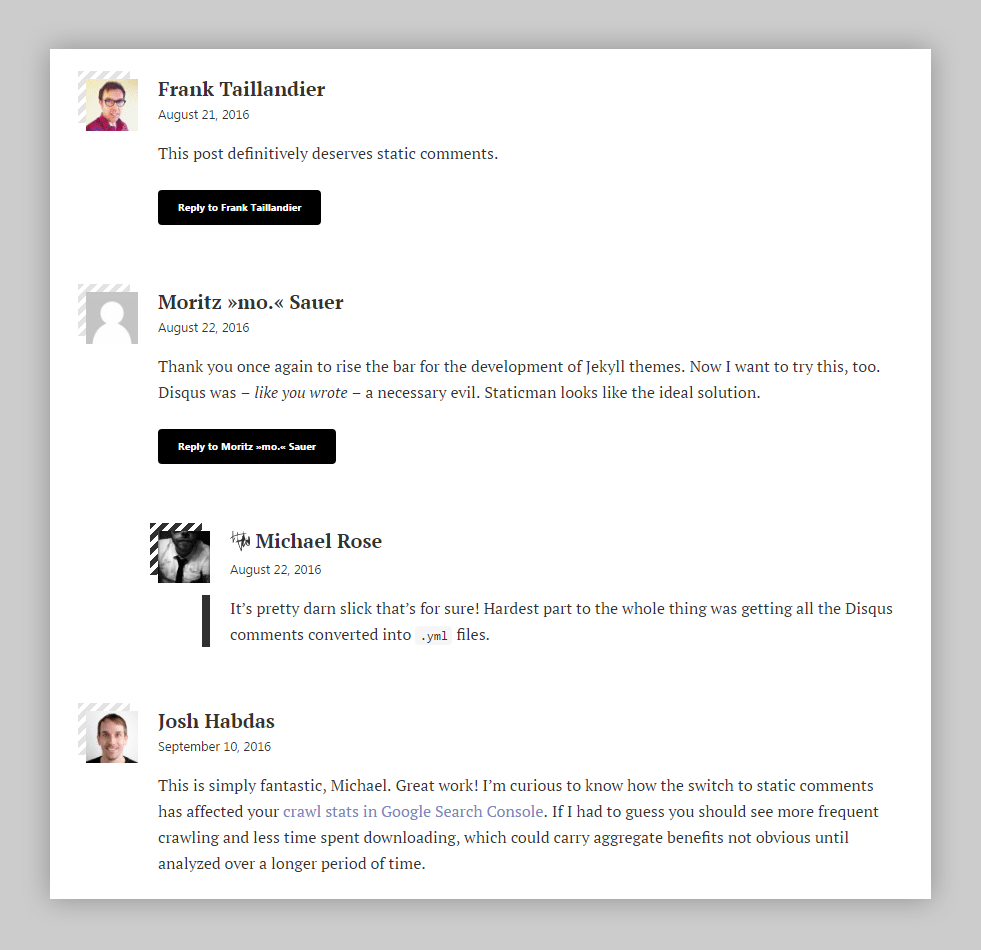
Nested comments one-level deep.
To give the reply link life I added the following onclick attribute and JavaScript to it.
onclick="return addComment.moveForm('comment-{{ include.index }}', '{{ include.index }}', 'respond', '{{ page.slug }}')"A few minor variable name changes to Wordpress’ comment-reply.js script was all it took to get everything working with my form markup.
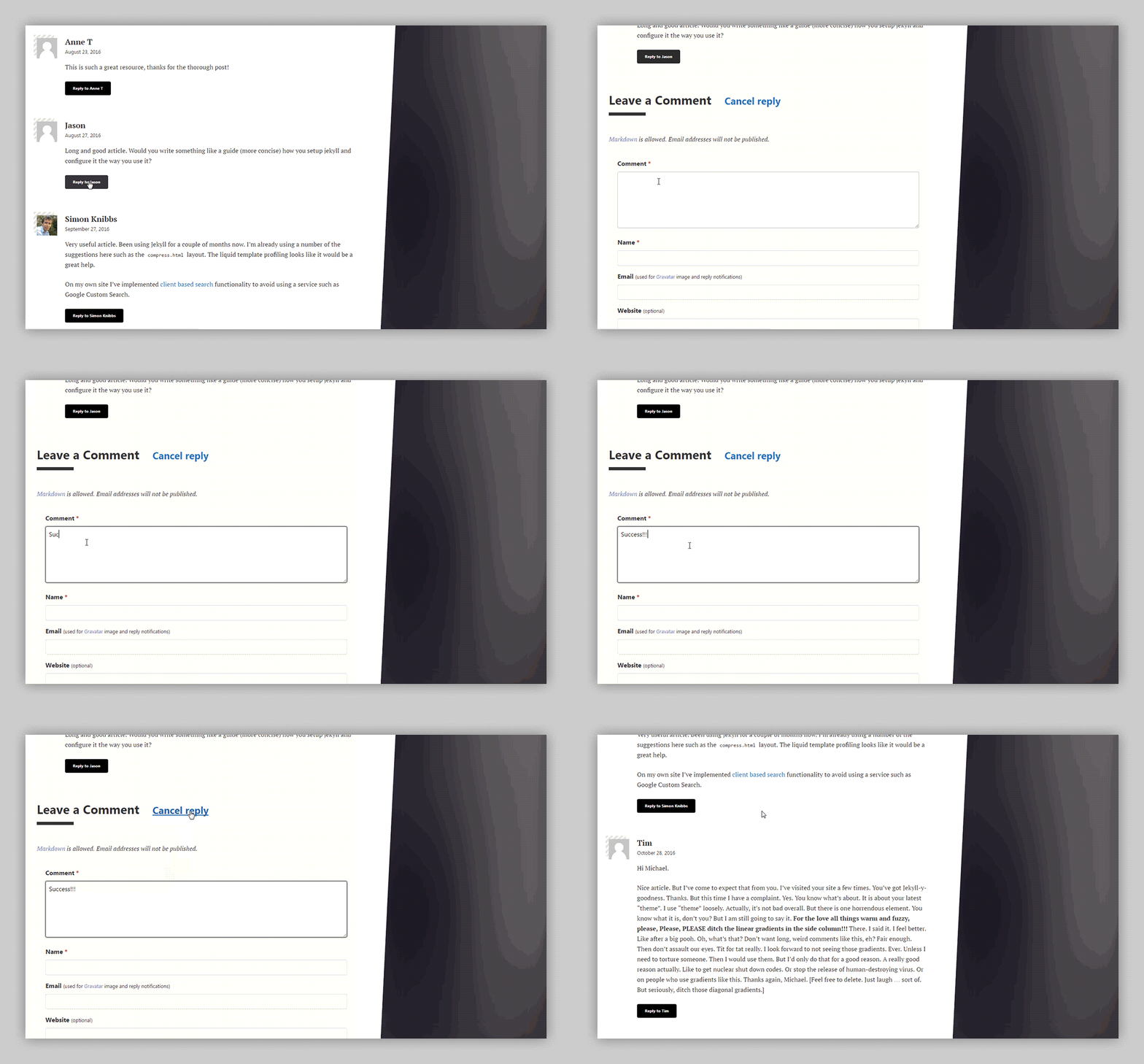
Hitting a reply button moves the comment form into view and populates <input type='hidden' id='comment-replying-to' name='fields[replying_to]' value=''> with the correct parent value. While tapping Cancel reply returns the input to its original state of null.
Add support for email notifications
Compared to nesting comment replies, email notifications were a breeze to setup.
Update staticman.yml configuration
To ensure that links in notification emails are safe and only come from trusted domains, set allowedOrigins accordingly.
Example:
allowedOrigins: ["mademistakes.com"]The domain(s) allowed here must match those passed from an options.origin field we’re going to add in the next step. Only domains that match will trigger notifications to send, otherwise the operation will abort.
The public instance of Staticman uses a Mailgun account with a limit of 10,000 emails a month. You are encouraged to create an account and add your own Mailgun API and domain to staticman.yml. Be sure you encrypt both using the following endpoint: https://api.staticman.net/v2/encrypt/{TEXT TO BE ENCRYPTED}.
Update comment form
To finish, add the following three fields to the comment form.
Field 1 + 2: Hidden input fields that pass the origin4 set in staticman.yml and unique identifier to the entry the user is subscriber to:
<input type="hidden" name="options[origin]" value="{{ page.url | absolute_url }}">
<input type="hidden" name="options[parent]" value="{{ page.url | absolute_url }}">
Field 3: A checkbox input for subscribing to email notifications.
<label for="comment-form-reply">
  <input type="checkbox" id="comment-form-reply" name="options[subscribe]" value="email">
  Notify me of new comments by email.
</label>
Nothing fancy here, name=options[subscribe] and value="email" are added to the field to associate subscription data with email address.
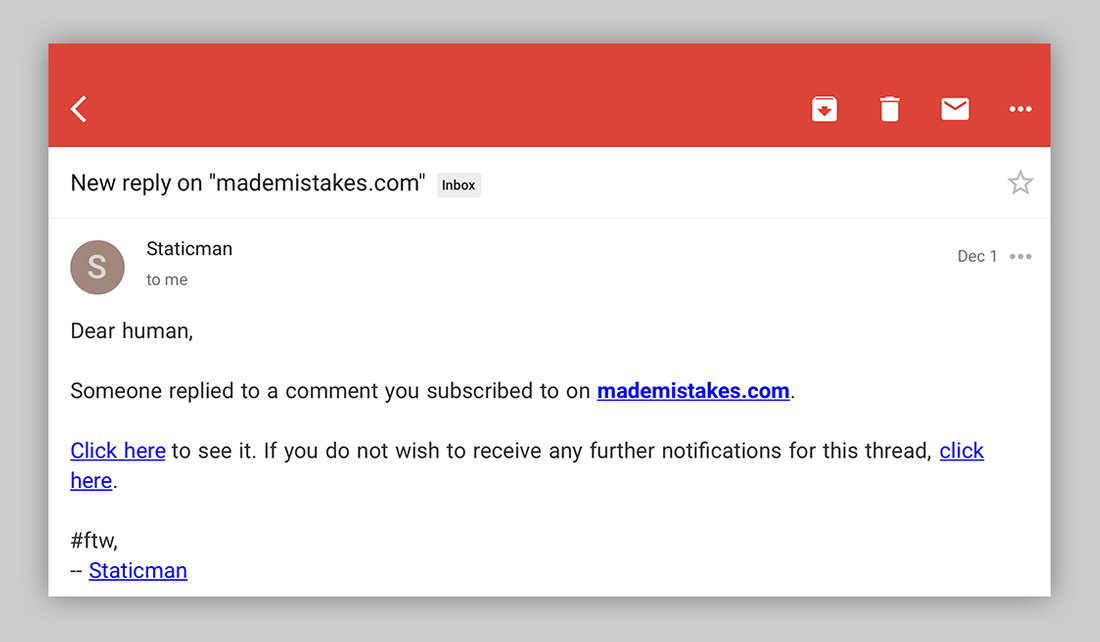
If setup correctly a user should receive an email anytime a new comment on the post or page they subscribed to is merged in.
Example of a Staticman New reply email notification:
Well there you have it, a static-based commenting system done up in Jekyll that handles nested comments and reply notifications. Now if I could only shave a minute of my build time to get new comments merged in quicker :frowning:.
-
An added benefit of the new configuration file means you can use Staticman with other static site generators.
↩v2no longer requires you to use a Jekyll specific_config.ymlfile. -
Site properties are optional. See Staticman documentation for details on hooking up your forms.
↩ -
↩15is not the same as'15'. Those single quotes make a world of difference… -
This URL will be included in the notification email sent to subscribers, allowing them to open the page directly.
↩
53 comments